
The Search Brief · News analysis
Agent Search Filters: Preserve the User’s Constraints Through Every Result
Build search filters that retain required conditions, expose state and handle zero results honestly, with a constraint-preservation worksheet.
Development covered: Primary documentation checked November 2, 2026
Agent search filters should make the current query, selected constraints, result scope and next action understandable. A reliable search task does not end when a page shows some plausible items. It ends when the selected result satisfies the user’s required conditions, or the system accurately explains that no suitable result has been established.
This requires more than a search box with an attractive dropdown. Filters can reset, defaults can change, counts can lag and result pages can mix family-level information with variant-level availability. Both people and agents need a clear record of what is being searched and which constraints remain active throughout the task.
Use established interaction semantics
W3C’s ARIA Authoring Practices Guide describes combobox patterns, including their associated popup and relevant keyboard interactions, roles, states and properties. It distinguishes several popup types and interaction choices. This is implementation guidance for accessible widgets, not evidence that every custom dropdown behaves correctly or that a particular agent can operate it. W3C combobox pattern.
Start with a suitable native control where it meets the task. If a custom widget is necessary, implement and test its complete behavior rather than copying its appearance. A visible list of suggestions does not automatically expose which option is active, selected or available. The control’s programmatic and visual states should agree.
The user should understand whether typing a value performs a search, selects a controlled option or merely filters suggestions. An agent that enters text but never commits the selected option can leave the form in an incomplete state. Clear instructions and observable state help prevent that ambiguity.
Do not use accessibility semantics as decoration. A role should match the actual interaction behavior. Incorrect semantics can make a control harder to use because it promises keyboard and state behavior the implementation does not deliver. Test the widget as part of the full task, including selection, clearing and recovery.
Build a constraint ledger
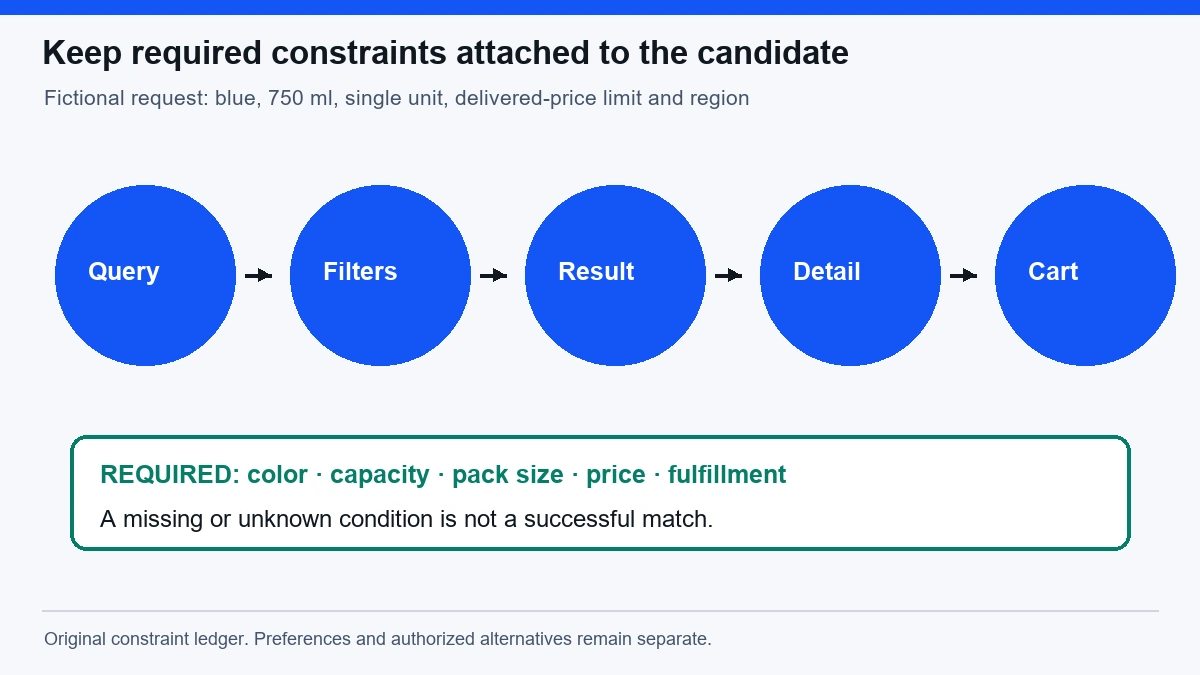
A constraint ledger is a practical record of the user’s required and preferred conditions. It can be maintained in the application or evaluation workflow; the important point is that the conditions remain explicit. Required constraints must not disappear silently when the search becomes difficult.
For a fictional product search, required conditions might include a blue 750 ml bottle, one unit, delivery to a specified region and a maximum delivered price. Preferences might include a particular material or delivery speed. The distinction determines whether an alternative can be selected automatically or requires a new decision.
Map each constraint to an observable field or evidence source. Color and capacity may come from variant attributes, availability from the current offer, and delivered price from a calculation using shipping information. A search-result title may establish only part of the match. Do not count an unknown condition as satisfied.
Use search intent alignment to define the underlying task before designing filters. A comparison task may need several candidates and decision criteria, while an exact-item task may need precise identity and current terms. The same interface should not obscure those different goals.
Make active filters visible and durable
Show selected filters in a recognizable summary, with clear ways to remove or change them. A user should be able to verify that price, region and category remain active after sorting or opening a result. Hidden filter state is difficult to inspect and easy to lose.
If a filter depends on another selection, explain the relationship. Changing category may invalidate a capacity option, but the interface should not silently discard it and present broader results as if they still satisfy the original request. State which constraint changed and why.
Preserve meaningful state when navigating between results and detail pages where the product supports it. A back action that resets every filter creates extra work and can cause an agent to continue from an unintended broader search. Test actual navigation, not only a single rendered result screen.
URLs can support shareable state when appropriate, but a URL parameter alone does not prove the backend applied the filter. Inspect returned results and visible state. Conversely, some state may live in the application rather than the URL. The task still needs a clear and recoverable representation of its active constraints.
A worked zero-result scenario
Imagine a fictional store search for a blue 750 ml single bottle under a delivered-price limit. The initial filters produce zero results. A weak interface quietly removes the color and price filters, then displays available bottles. An agent may select a plausible item while believing the original constraints still apply.
A stronger interface keeps the zero-result state and explains which constraints are active. It can suggest relaxing a preference or show clearly labelled alternatives. If color is required, the agent should not remove it without authorization. If delivery speed is a preference, the user may have already allowed a slower option.
Suppose one alternative matches color and capacity but is a two-pack. The result should expose package quantity so the mismatch is visible. The agent should record that the candidate fails the single-unit constraint, rather than infer that a similar image is an acceptable substitute.
These examples are illustrative. They show why no result can be a correct outcome. A search system should help the user understand the available decision, not force apparent completion by changing the problem without notice.
Counts and results must describe the same state
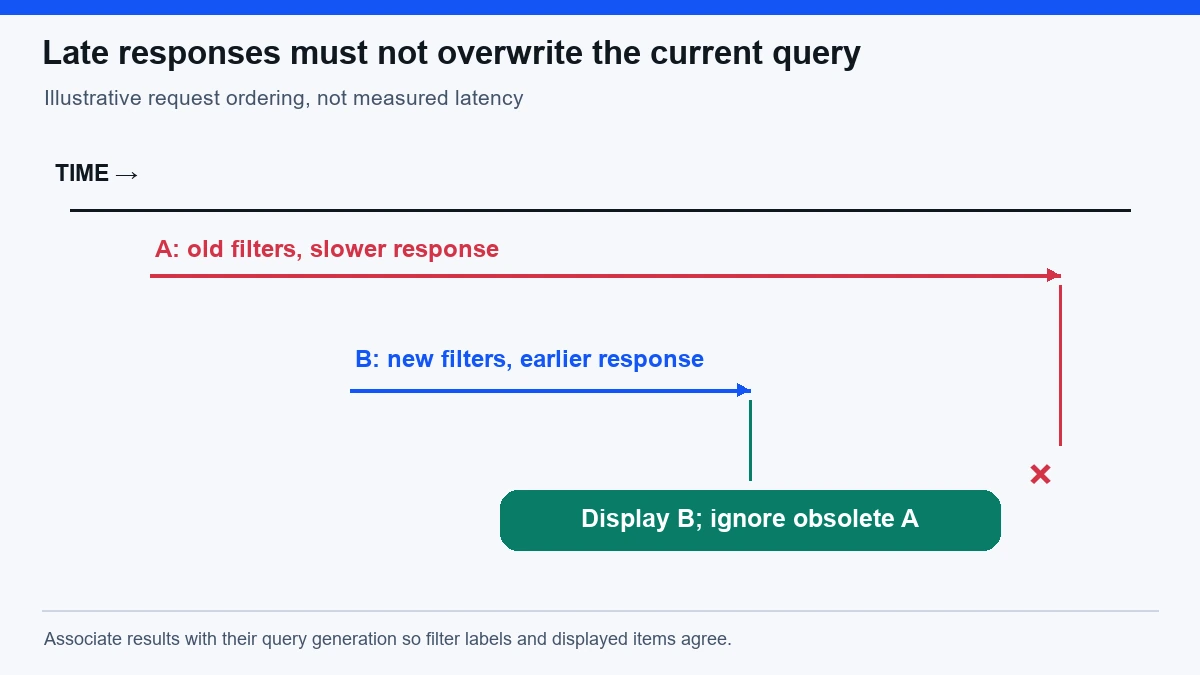
A result count can be stale while a new filter request is pending. Distinguish loading from completed results so that an agent does not evaluate old items under new selected filters. A spinner without a meaningful state can leave uncertainty about which query produced the current list.
Handle out-of-order responses. A slower request for an earlier filter state can arrive after a newer request and overwrite the displayed results. The interface may then show current filter chips above an obsolete list. Associate responses with their query state and ensure the displayed combination is coherent.
Pagination and infinite loading need the same discipline. New pages should belong to the active query and filters. If the user changes a constraint, previously loaded items may need to be replaced or clearly separated. Mixing result generations can create a list that never existed under any single valid query.
Sorting also has scope. Sorting by displayed price may differ from sorting by delivered total or selected variant price. State what the ordering means and do not let a generic lowest-price label imply a comparison the system did not perform. An agent should verify the decision-relevant value before action.
Distinguish discovery from final eligibility
Search filters narrow candidates; they do not necessarily establish every purchase condition. A result can match broad attributes while the selected variant is unavailable in the user’s region. The detail and checkout stages may need additional checks. Make that progression clear rather than treating the result card as a complete offer contract.
The ecommerce SEO best-practices guide places filters within a wider catalog and fulfillment strategy. For agent tasks, keep the required constraints attached as candidates move from category results to detail pages and current offers.
For service directories, distinguish coverage area, current availability, qualification and evidence quality. A filter labelled near me may use a broad location estimate rather than confirm that a provider serves the exact address. The result should expose the relevant limits and a suitable next verification step.
For technical documentation search, a result may match the topic while referring to an old version. Include version constraints where they matter and make historical material recognizable. A semantically relevant page can still be unsuitable evidence for the current task.
Keep filter controls usable across methods
Test keyboard operation through opening, navigating, selecting, clearing and closing controls. Check visible focus and the relationship between the input and popup. Then test the authorized agent’s supported interaction method. A successful mouse interaction does not establish equivalent behavior for other methods.
Use meaningful names for repeated controls. Several unlabeled remove buttons can be difficult to distinguish; a name that identifies the filter being removed is more useful. The same applies to sort controls, pagination actions and result links. The interface should reveal purpose rather than depend on spatial guessing.
Make error states actionable. If a filter request fails, preserve the selected constraints and explain whether the displayed results are old, absent or incomplete. Do not present stale results as a successful refreshed set. The user needs to know whether another attempt is safe and meaningful.
Avoid keyboard traps and unexpected focus movement when results update. A user selecting one filter may still need to select another. Moving focus to the top of the result list after every change can interrupt the task. The appropriate behavior depends on the interaction, so test it with realistic multi-filter sequences.
Diagnose the full search path
Trace the query and filter payload through request handling, backend evaluation, response identity, displayed state and selected result. A screenshot showing filter chips is not proof that the backend applied them. A successful backend response is not proof that the frontend displayed the correct generation.
Check cache dimensions. If the cache key ignores region or variant constraints, the application can return plausible but wrong results efficiently. A high cache-hit rate can coexist with poor task correctness. Inspect representative request combinations and the actual returned items.
Use the technical SEO checklist for crawl and rendering concerns around category and faceted pages. Search-discovery policy and interactive filter correctness are related but separate: controlling indexation does not establish that a filter preserves user constraints.
Check background indexing and freshness. A new item may be available in the catalog but absent from search until an update completes. A retired item may remain searchable. Record source cadence, index delay and consumer deadlines so that missing results are assigned to the correct stage rather than explained as user intent automatically.
Test constraint preservation under change
Create realistic tasks with required and preferred conditions, exact identifiers, ambiguous language and no suitable result. Include a filter change while a previous request is slow, back navigation from a detail page and a region change. Verify the final selected item against the original constraint ledger.
Do not measure success only as a click on a result. The chosen item may violate a required condition. Count correct matches, appropriate clarifications, accurate no-result outcomes and failures separately. A lower apparent completion rate can reflect better respect for constraints rather than a worse product.
Group repeated attempts by task intent. Ten observations of one lost price filter show persistence of a defect, not ten independent customer opportunities. Preserve counts of unique tasks and repeated runs so that the report communicates both breadth and instability.
After repair, verify the deployed path with fresh evidence. A passing component test is narrower than a correct sequence through search, selection and final eligibility checks. State which stages were observed and which remain outside the test scope.
Questions for a filter-task review
Should zero results trigger automatic relaxation? Only where the product clearly communicates the change and the user’s authorization permits it. Required conditions should not be dropped silently. Suggesting alternatives is useful; presenting them as exact matches is misleading.
Does a selected filter chip prove the result matches? No. It shows interface state. The request, backend evaluation and displayed results must agree. Verify the actual candidate attributes and relevant current offer conditions before a consequential action.
What is the first useful repair? Find the earliest point where a required constraint becomes hidden, stale or unenforced. Repair that transition and verify the downstream task. Reliable search preserves the user’s problem rather than producing attractive results for a different one.
A constraint-preservation worksheet
This worksheet makes the fictional bottle-search example testable. It separates a result that is a candidate from one that satisfies the user’s required conditions. A test should retain the original request and inspect the final selected offer, because a result card can omit attributes that later become decisive.
| Constraint | Required or preferred | Evidence needed | Acceptable handling when unmet |
|---|---|---|---|
| Blue color | Required in this example | Named selected variant, not photograph alone | Report mismatch or seek authorization for an alternative |
| 750 ml capacity | Required in this example | Variant attribute and accepted cart identity | Reject smaller capacity as a nonmatching candidate |
| One physical unit | Required in this example | Pack size and quantity considered together | Distinguish a two-pack from a single-unit offer |
| Delivered-price ceiling | Required in this example | Current item total plus applicable delivery terms | Return for review if the authorized ceiling is exceeded |
| Delivery speed | Preference if the user allowed flexibility | Current available service and estimated timing | Suggest a slower option without relaxing required attributes |
| Active region | Required fulfillment context | Address-dependent eligibility or stated offer scope | Explain unsupported delivery rather than silently changing region |
| No exact result | Valid possible outcome | Completed search under the unchanged required constraints | Preserve filters and label alternatives as alternatives |
Add a column for the actual observed value when using the worksheet. An unknown should remain unknown until evidence resolves it. This prevents an evaluation from awarding success merely because the agent clicked a plausible result and reached a cart.